Silencio Voice AI: Recording to Earn or Wasting Time? — The Facts!
Introduction
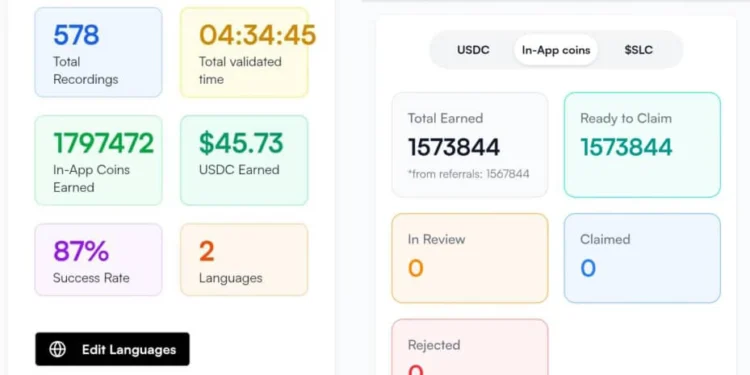
Hey guys , do you know that Silencio Voice AI is a platform that pays users for helping train AI by recording their voice in any chosen native language. There are various campaigns available on Silencio and as a user, if you decide to participate in any of the campaigns, you will be required to record your voice while reading out sentences in order to help train Artificial Intelligence (AI) and get paid when clients or interested brands pay for the voice recordings or data submitted. Silencio has been trending for a while now but what most people fail to understand is that, there are key details about it that are not talked about, just enough.
About Silencio Voice AI
Silencio Voice AI is a recording platform that pays users in crypto for helping train AI. As a user, you get rewarded by the platform when you record your voice while speaking any native language available on the site. They set up campaigns in various languages such as French, English, Igbo, Yoruba, Hausa, Greek etc. and if you are a native speaker of the language, you will be given the opportunity to participate by recording your voice while speaking the language and then, submit the recordings to them.Silencio now places it for sale after approval, rewards you with In-App coins and after sometime if you’re lucky, you get paid in USDC directly to your submitted wallet address on the peaq network. In recent times, there’s been numerous AI training applications and platforms all claiming to reward users for selling their data (images, voice, videos etc) it’s now a very common thing and the funny thing is, most online entrepreneurs have little to no problems doing that since it can pass as one of the easiest sources of income on the Internet. Imagine getting paid for just recording voice in your own language, makes much sense from a distance.
Earning Methods
The ways of earning on Silencio AI has already been mentioned but for the sake of details, I'll give a better breakdown of the ways through which users earn;
- Participating in Recording Campaigns
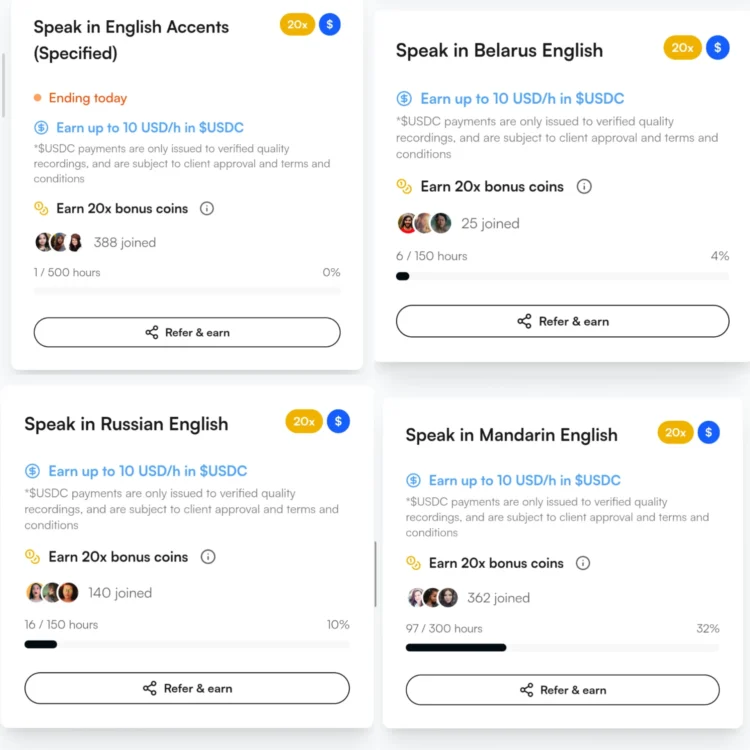
Alright guys as a user, you are to select where you are from during the onboarding process to qualify for the campaigns in your local language i.e. if your language is formally recognized on the platform. After registering, click on the three lines at the top right corner, you will see Earning Opportunities. Tap on it to see the campaigns you qualify for and the ones you can share.
- Referral Program
So guys ,Silencio has a referral program that is nothing short of enticing. I’m not in any way trying to market the platform but the referral program is rewarding and part of the thing that attracted me at first you can refer people who speak same language as you to participate in the same campaign or you can go to the available to share campaigns, find the languages you feel your friends and family members can speak better and share the link to them.
How to Get Started
Alright guys, to participate, the first thing is to create an account on Silencio Voice AI, fill the sign up form with your real details. It’s important to enable them match you with campaigns that are well suited.
After sign up, click on earning opportunities in the menu bar, proceed to participate in the one that you qualify for. Record your voice while answering the questions being asked, just try as much as possible to free and natural while recording.
How to Connect USDC Address on Silencio
So guys ,there are a couple of ways to connect your USDC on peaq network to silencio Voice AI but making use of TokenPocket seems to be the most stress-free method.
Simply download TokenPocket from either Playstore or App store, proceed to create a wallet. You will be asked to select a single network while creating the wallet, simply search for Peaq network as shown in the screenshot below.
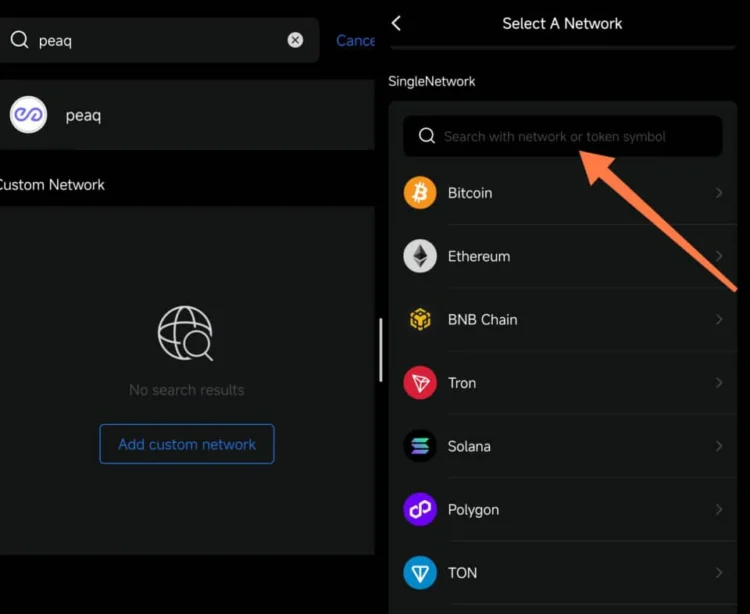
Tap on it and proceed to create a wallet using the peaq network, after which, you copy the peaq wallet address from TokenPocket and submit on Silencio in the space provided for address. The peaq network address can receive all tokens under peaq.
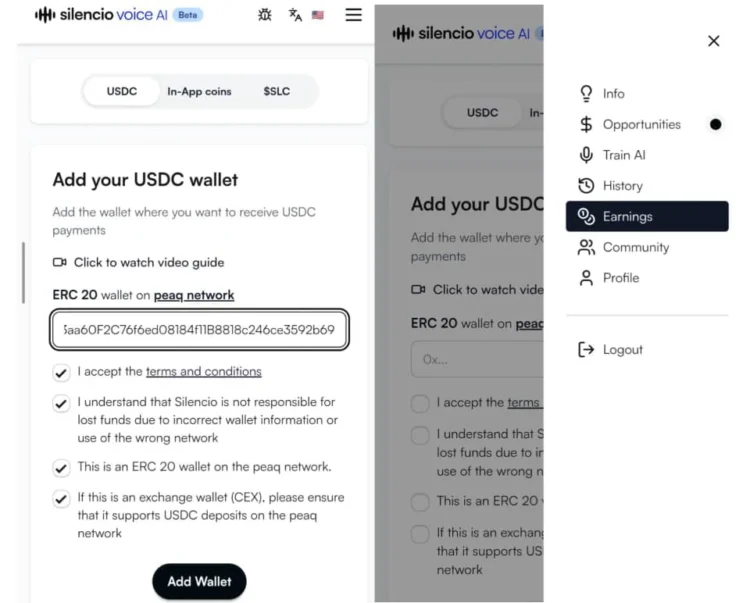
To do this, click on the three lines at the top right corner, tap on Earnings, the first page asking you to submit USDC on Peaq, copy the address and submit, then tick all the boxes and proceed to Add Wallet.
Thanks For Reading Guys, hope you benefit from my post
N/B: all screenshots taken with my android phone.