How to Use custom_json for Immutable Data Storage on Steem — and Index It with HiveMind as a Seperate Micro Service
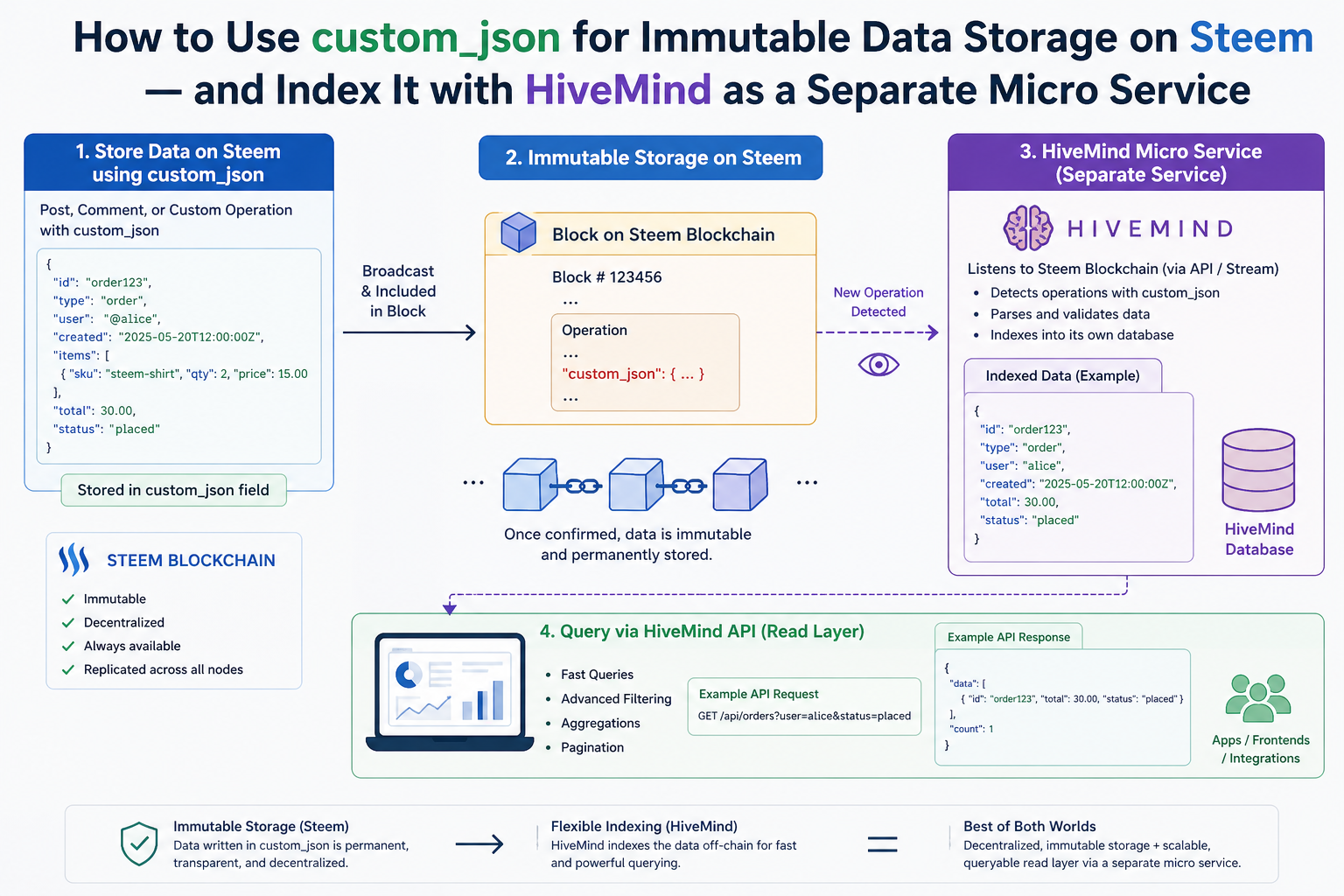
One of the most underused features of the Steem blockchain is custom_json. While most developers think of Steem as a blogging platform, its custom_json operation lets you write any structured data permanently and immutably into the blockchain — and with HiveMind, you can run your own node that indexes that data and serves it through a JSON-RPC API.
This post walks through the full picture: what custom_json is, why it's a powerful tool for decentralized apps, and exactly how to extend HiveMind to index your own custom operations. We'll use the Friends API — a real feature built into this fork of HiveMind and live at https://steemd.blazeapps.org — as a complete worked example.
What Is custom_json?
custom_json is a native Steem blockchain operation. Unlike posting or voting, it has no predefined meaning — it's a free-form slot that lets any application write JSON data into the chain.
A custom_json transaction has four fields:
{
  "id": "my_app",
  "json": "[\"action\", {\"key\": \"value\"}]",
  "required_posting_auths": ["alice"],
  "required_auths": []
}
id— a short string your application uses to identify its ops (like a namespace). HiveMind uses"follow","community","notify", and"friend".json— a JSON-encoded string containing your payload. The standard format used by HiveMind is["command", {payload_object}].required_posting_auths— exactly one account name: the account signing the operation. This is cryptographically verified by the blockchain.required_auths— leave empty. Active-key ops are ignored by HiveMind.
Once a custom_json op is included in a block, it is permanent and immutable. No one — not Steemit Inc, not witnesses, not you — can delete or alter it. This makes it ideal as a trust layer for social graphs, credential systems, marketplace listings, reputation scores, or any data your application needs to anchor to identities.
Why custom_json = Immutable Application Storage
Traditional backend databases are mutable, centralized, and controlled by whoever runs the server. custom_json gives you the opposite:
| Property | Traditional DB | custom_json on Steem |
|---|---|---|
| Mutable | Yes | No — permanent once in a block |
| Censorship-resistant | No | Yes — no single party controls it |
| Identity-linked | Via login/auth system | Cryptographically signed by Steem account |
| Publicly auditable | Only if you expose it | Yes — every node can see every op |
| Cost | Infrastructure | A tiny amount of Resource Credits |
The tradeoff is that raw blockchain data is not queryable in a useful way. You can't run SELECT * FROM friendships WHERE account = 'alice' against a node. That's where HiveMind comes in.
HiveMind: Your Indexer and Data Provider
HiveMind is a Python service that runs alongside a Steem node. It reads every block from the chain, intercepts custom_json ops it understands, and writes the interpreted state into a PostgreSQL database. A separate HTTP process then serves that state through a JSON-RPC API on port 8080.
Steem Node  ──►  HiveMind Sync  ──►  PostgreSQL  ──►  HiveMind Server  ──►  Your App
(raw blocks)    (interprets ops)    (queryable)      (JSON-RPC API)
The sync service and API server are the same Python package but run as separate modes:
hive sync    # reads the chain, writes to postgres
hive server  # reads postgres, serves JSON-RPC
When you add a new custom_json id, HiveMind will start saving its state to a table you define, and your app can query that state through a clean API — without ever touching raw blockchain data.
The Full Pipeline: From Transaction to API Response
Here is what happens when someone broadcasts a custom_json op with your id:
- Block arrives at
hive/indexer/sync.py→Sync.listen() Blocks.process(block)extracts all operations from all transactionsCustomOp.process_ops(ops, block_num, block_date)inhive/indexer/custom_op.pyfilters ops by theiridfield — unknown ids are skipped- The op is passed to your indexer class which validates it and writes state to PostgreSQL
flush()is called at the end of each block's transaction to commit any batched writes- Your API methods in
hive/server/<your_api>/query that state and return it over JSON-RPC
The whole thing runs inside a single START TRANSACTION / COMMIT per block, so your database is always in a consistent state reflecting a specific block height.
Step-by-Step: Adding a New custom_json Type
We'll build everything in five files. Use the Friends API as your reference implementation throughout.
Step 1 — Design Your Op Format
Before writing any code, define the on-chain format your application will broadcast.
HiveMind's convention (used by all existing op types) is:
["command_name", {"field1": "value1", "field2": "value2"}]
This gets JSON-encoded as a string into the json field of the transaction.
Example for a hypothetical "badge" system:
| command | payload | meaning |
|---|---|---|
"award" | {"from": "admin", "to": "alice", "badge": "curator"} | award a badge |
"revoke" | {"from": "admin", "to": "alice", "badge": "curator"} | revoke a badge |
Rules to enforce:
frommust equal the transaction signer (prevents impersonation)- Both
fromandtomust be existing Steem accounts badgemust be in a known set
Step 2 — DB Schema
Two files to edit:
hive/db/schema.py — add your table definition inside build_metadata():
sa.Table(
    'hive_badges', metadata,
    sa.Column('awarder',    sa.Integer,    nullable=False),
    sa.Column('account',    sa.Integer,    nullable=False),
    sa.Column('badge',      VARCHAR(32),   nullable=False),
    sa.Column('awarded_at', sa.DateTime,   nullable=False),

    sa.UniqueConstraint('awarder', 'account', 'badge', name='hive_badges_ux1'),
    sa.Index('hive_badges_ix1', 'account', 'badge', 'awarded_at'),
)
Also bump the version constant at the top:
DB_VERSION = 28 # was 27
hive/db/db_state.py — add a migration block at the bottom of DbState._ensure_schema():
if cls._ver == 27:   # current version before your change
    log.info("[HIVE] Creating hive_badges table...")
    sql = """
        CREATE TABLE hive_badges (
            awarder    INTEGER      NOT NULL,
            account    INTEGER      NOT NULL,
            badge      VARCHAR(32)  NOT NULL,
            awarded_at TIMESTAMP    NOT NULL,
            CONSTRAINT hive_badges_ux1 UNIQUE (awarder, account, badge)
        );
        CREATE INDEX hive_badges_ix1 ON hive_badges (account, badge, awarded_at);
    """
    cls.db().query(sql)
    log.info("[HIVE] hive_badges table created")
    cls._set_ver(28)
This migration runs automatically the next time hive sync starts. HiveMind will detect that the DB is at version 27 and upgrade it before beginning to sync.
Step 3 — The Indexer Module
Create hive/indexer/badges.py. This is where your business logic lives.
"""Handles badge award/revoke operations."""

import logging
from hive.db.adapter import Db
from hive.indexer.accounts import Accounts

log = logging.getLogger(__name__)
DB = Db.instance()

VALID_BADGES = {'curator', 'author', 'developer', 'witness'}

class Badges:

    @classmethod
    def process_op(cls, account, op_json, date):
        """
        account  — signing account (from required_posting_auths)
        op_json  — already parsed: ["command", {payload}]
        date     — block timestamp string
        """
        cmd, payload = op_json

        from_acct = payload.get('from', '')
        to_acct   = payload.get('to', '')
        badge     = payload.get('badge', '')

        # Impersonation guard — signer must be the 'from' account
        if from_acct != account:
            log.warning("[BADGE] Impersonation: auth='%s' from='%s'", account, from_acct)
            return

        # Both accounts must exist on chain
        if not Accounts.exists(from_acct):
            log.warning("[BADGE] Unknown awarder: %s", from_acct)
            return
        if not Accounts.exists(to_acct):
            log.warning("[BADGE] Unknown target: %s", to_acct)
            return

        # Validate badge name
        if badge not in VALID_BADGES:
            log.warning("[BADGE] Unknown badge: %s", badge)
            return

        awarder_id = Accounts.get_id(from_acct)
        account_id = Accounts.get_id(to_acct)

        if cmd == 'award':
            cls._award(awarder_id, account_id, badge, date)
        elif cmd == 'revoke':
            cls._revoke(awarder_id, account_id, badge)

    @classmethod
    def _award(cls, awarder_id, account_id, badge, date):
        sql = """
            INSERT INTO hive_badges (awarder, account, badge, awarded_at)
            VALUES (:awarder, :account, :badge, :at)
            ON CONFLICT ON CONSTRAINT hive_badges_ux1 DO NOTHING
        """
        DB.query(sql, awarder=awarder_id, account=account_id, badge=badge, at=date)
        log.info("[BADGE] Awarded '%s' to account_id=%d", badge, account_id)

    @classmethod
    def _revoke(cls, awarder_id, account_id, badge):
        DB.query(
            "DELETE FROM hive_badges WHERE awarder=:a AND account=:acc AND badge=:b",
            a=awarder_id, acc=account_id, b=badge)
        log.info("[BADGE] Revoked '%s' from account_id=%d", badge, account_id)

    @classmethod
    def flush(cls, trx=True):
        # Direct writes — nothing to flush
        return 0
Important rules for every indexer module:
- All DB calls use
DB.query()— synchronous, never async - Always call
Accounts.exists()beforeAccounts.get_id()— the accounts table may not yet have the account if the op references a very new account - Always verify
from_acct == accountbefore writing anything — this is the only protection against one user spoofing another's actions - Swallow all exceptions with a
log.warning()— a bad op on-chain must never abort the entire block
Step 4 — Plug Into the CustomOp Dispatcher
Edit hive/indexer/custom_op.py — three changes:
Add the import at the top with the other indexer imports:
from hive.indexer.badges import Badges
Add your id to the allowlist in process_ops():
# Before (existing line):
if op['id'] not in ['follow', 'community', 'notify', 'friend']:
    continue

# After:
if op['id'] not in ['follow', 'community', 'notify', 'friend', 'badge']:
    continue
Add the dispatch branch at the bottom of the elif chain:
elif op['id'] == 'badge':
    cls._process_badge(account, op_json, block_date)
Add the handler method to the CustomOp class:
@classmethod
def _process_badge(cls, account, op_json, block_date):
    """Handle 'badge' custom_json ops."""
    try:
        command, payload = valid_op_json(op_json)
        valid_command(command, valid=('award', 'revoke'))
        assert 'from' in payload, 'missing: from'
        assert 'to' in payload, 'missing: to'
        assert 'badge' in payload, 'missing: badge'
        Badges.process_op(account, [command, payload], block_date)
    except AssertionError as e:
        log.warning("[BADGE] Validation fail: %s in %s", e, op_json)
valid_op_json (from hive/utils/json.py) enforces that the payload is [str, dict]. valid_command asserts the command is in the allowed set. Both raise AssertionError on failure — caught here so a malformed op never crashes the indexer.
Step 5 — Hook Into the Sync Loop
Edit hive/indexer/sync.py. Add the import near the top:
from hive.indexer.badges import Badges
Then call flush() inside the listen() method, after Blocks.process(block):
self._db.query("START TRANSACTION")
num   = Blocks.process(block)
follows = Follow.flush(trx=False)
Friendship.flush(trx=False)
Badges.flush(trx=False)          # <-- add this line
accts = Accounts.flush(steemd, trx=False, spread=8)
# ...
self._db.query("COMMIT")
Calling flush(trx=False) inside an already-open transaction means all indexer writes for a block commit atomically. If the process crashes mid-block, the transaction rolls back and the block is re-processed cleanly on next startup.
Step 6 — The API Server Layer
Create the directory hive/server/badge_api/ with three files.
__init__.py — empty file.
cursor.py — raw async SQL, one function per query type:
"""Cursor queries for the badge API."""

async def _get_account_id(db, name):
    _id = await db.query_one("SELECT id FROM hive_accounts WHERE name = :n", n=name)
    assert _id, "account not found: `%s`" % name
    return _id


async def get_account_badges(db, account: str, limit: int = 100):
    """Get all badges held by an account."""
    account_id = await _get_account_id(db, account)
    sql = """
        SELECT ha.name AS awarder, b.badge, b.awarded_at
        FROM hive_badges b
        INNER JOIN hive_accounts ha ON b.awarder = ha.id
        WHERE b.account = :aid
        ORDER BY b.awarded_at DESC
        LIMIT :lim
    """
    rows = await db.query_all(sql, aid=account_id, lim=limit)
    return [dict(awarder=row[0], badge=row[1], awarded_at=row[2]) for row in rows]


async def get_badge_holders(db, badge: str, awarder: str = None, limit: int = 100):
    """Get all holders of a specific badge, optionally filtered by awarder."""
    where = "b.badge = :badge"
    params = dict(badge=badge, lim=limit)

    if awarder:
        awarder_id = await _get_account_id(db, awarder)
        where += " AND b.awarder = :awarder_id"
        params['awarder_id'] = awarder_id

    sql = """
        SELECT ha.name AS holder, ha2.name AS awarder, b.awarded_at
        FROM hive_badges b
        INNER JOIN hive_accounts ha  ON b.account  = ha.id
        INNER JOIN hive_accounts ha2 ON b.awarder  = ha2.id
        WHERE %s
        ORDER BY b.awarded_at DESC
        LIMIT :lim
    """ % where
    rows = await db.query_all(sql, **params)
    return [dict(holder=row[0], awarder=row[1], awarded_at=row[2]) for row in rows]
methods.py — thin validation wrappers around the cursor functions:
"""Badge API methods."""

from hive.server.common.helpers import return_error_info, valid_account, valid_limit
import hive.server.badge_api.cursor as cursor

VALID_BADGES = {'curator', 'author', 'developer', 'witness'}

@return_error_info
async def badge_get_account_badges(context, account: str, limit: int = None):
    """Get badges held by an account."""
    rows = await cursor.get_account_badges(
        context['db'],
        valid_account(account),
        valid_limit(limit or 100, 1000))
    return [dict(awarder=r['awarder'],
                 badge=r['badge'],
                 awarded_at=str(r['awarded_at'])) for r in rows]


@return_error_info
async def badge_get_holders(context, badge: str, awarder: str = None, limit: int = None):
    """Get all holders of a badge."""
    assert badge in VALID_BADGES, 'unknown badge: %s' % badge
    rows = await cursor.get_badge_holders(
        context['db'],
        badge,
        valid_account(awarder) if awarder else None,
        valid_limit(limit or 100, 1000))
    return [dict(holder=r['holder'],
                 awarder=r['awarder'],
                 awarded_at=str(r['awarded_at'])) for r in rows]
Finally, register the methods in hive/server/serve.py inside build_methods():
from hive.server.badge_api import methods as badge_api

# Add inside build_methods():
methods.add(**{'badge_api.' + m.__name__: m for m in (
    badge_api.badge_get_account_badges,
    badge_api.badge_get_holders,
)})
Step 7 — Broadcasting From a Client
Any Steem library can broadcast custom_json. Here's a Python example using steem-python:
from steem import Steem

s = Steem(keys=['your-posting-key'])

# Award a badge
s.custom_json(
    id='badge',
    json_data=["award", {"from": "admin-account", "to": "alice", "badge": "curator"}],
    required_posting_auths=['admin-account']
)
Or with the Steem JavaScript library:
const steem = require('steem');

steem.broadcast.customJson(
  postingKey,
  [],                              // required_auths (empty)
  ['admin-account'],               // required_posting_auths
  'badge',                         // id
  JSON.stringify(["award", { from: "admin-account", to: "alice", badge: "curator" }]),
  (err, result) => console.log(err, result)
);
Once confirmed in a block, HiveMind will pick it up on the next block it processes — there is no polling delay.
Real Example: The Friends API
The Friends API is a complete implementation of this exact pattern already in this HiveMind fork. A live instance is running at https://steemd.blazeapps.org — you can query it right now without setting up anything locally. The full source is at https://github.com/blazeapps007/hivemind on the Friends-api branch.
Here is how it works end-to-end.
The State Machine
Friendship has three states stored as integers in the state column of hive_friendships:
0 = none (no row, or deleted)
1 = pending (request sent, awaiting acceptance)
2 = friends (mutual)
The table stores directed rows: (requester → target, state). A mutual friendship means both (alice→bob, 2) and (bob→alice, 2) exist.
On-Chain Operations
| id | command | payload | who broadcasts | effect |
|---|---|---|---|---|
friend | request | {"from":"alice","to":"bob"} | alice | inserts (alice→bob, 1) |
friend | accept | {"from":"bob","to":"alice"} | bob | upgrades both rows to state 2 |
friend | reject | {"from":"bob","to":"alice"} | bob | deletes both rows |
friend | cancel | {"from":"alice","to":"bob"} | alice | deletes (alice→bob, 1) |
friend | unfriend | {"from":"alice","to":"bob"} | alice | deletes both rows |
Notice that from always refers to the account taking action — and from must match the transaction signer. This prevents alice from accepting or rejecting on bob's behalf.
The Indexer (hive/indexer/friendship.py)
The _accept command has the most interesting logic. When bob accepts alice's request:
- Look up
(bob→alice)— the target's view of the requester - If already FRIENDS, no-op
- Otherwise insert or update
(bob→alice, 2) - Also upgrade the original
(alice→bob)row from PENDING to FRIENDS
This keeps both directions in sync atomically within the block transaction.
Querying the API
Once your HiveMind node is synced, query friend state via JSON-RPC:
All examples below use the live node. Replace https://steemd.blazeapps.org with http://localhost:8080 if running locally.
Get all pending requests sent by alice:
curl --data '{
  "jsonrpc": "2.0",
  "id": 1,
  "method": "friend_api.friend_get_sent_requests",
  "params": {"account": "alice", "state": "pending"}
}' https://steemd.blazeapps.org
Response:
{
  "jsonrpc": "2.0",
  "id": 1,
  "result": [
    {"target": "bob", "state": "pending", "created_at": "2026-04-10 09:30:00"},
    {"target": "charlie", "state": "pending", "created_at": "2026-04-09 14:12:00"}
  ]
}
Get alice's mutual friends:
curl --data '{
  "jsonrpc": "2.0",
  "id": 2,
  "method": "friend_api.friend_get_friends",
  "params": {"account": "alice"}
}' https://steemd.blazeapps.org
Check the status between two specific accounts:
curl --data '{
  "jsonrpc": "2.0",
  "id": 3,
  "method": "friend_api.friend_get_friendship_status",
  "params": {"account": "alice", "target": "bob"}
}' https://steemd.blazeapps.org
Response:
{
  "jsonrpc": "2.0",
  "id": 3,
  "result": {
    "account": "alice",
    "target": "bob",
    "account_to_target": "friends",
    "target_to_account": "friends"
  }
}
Get counts (useful for UI badges):
curl --data '{
  "jsonrpc": "2.0",
  "id": 4,
  "method": "friend_api.friend_get_friend_counts",
  "params": {"account": "alice"}
}' https://steemd.blazeapps.org
{
  "result": {
    "account": "alice",
    "sent_pending": 2,
    "received_pending": 5,
    "friends_count": 23
  }
}
Running Your Custom HiveMind Node
Clone the fork and check out the Friends-api branch:
git clone https://github.com/blazeapps007/hivemind.git
cd hivemind
git checkout Friends-api
Build the Docker image:
docker build -t hivemind:custom .
Then use the Full-API-Sample/docker-compose.yaml included in the repo as a starting point. It wires together:
postgres:12— the state databaseredis:latest— cache invalidation- A Steem API node (or point
STEEMD_URLat an existing public node) hivemind:custom— your extended indexer + API serverjussi— optional reverse proxy that routes each API namespace to the right upstream
The jussi/config.json already includes routing rules for friend_api. Add your own namespace there to expose it through a unified endpoint.
For a full production stack starting from an existing database dump (recommended — a full sync from genesis takes days):
# Import an existing hivemind dump
psql -U steem -d hivedb < hivemind.sql

# Then start the stack — hivemind will migrate schema to your version and begin live-following
docker-compose up -d
What You Can Build With This
Once you have the pattern, you can index any social or application primitive on-chain:
- Reputation scores — broadcast score updates, HiveMind keeps the latest per account
- Marketplace listings —
list,update,soldcommands with item metadata - Credential / badge systems — like the example above
- Private group membership — join/leave/kick commands per community
- Gaming leaderboards — score submissions linked to Steem identities
- Voting registries — off-content voting for proposals, elections, polls
Every piece of data is anchored to a Steem account, cryptographically signed, and permanently on-chain. Your HiveMind node turns that append-only log into a queryable, always-current relational view.
Summary
| What | Where |
|---|---|
| On-chain op format | ["command", {payload}] in a custom_json tx with your id |
| Schema definition | hive/db/schema.py (SQLAlchemy table) + hive/db/db_state.py (migration) |
| Indexer logic | hive/indexer/<feature>.py — synchronous, impersonation-guarded, exception-safe |
| Dispatcher | hive/indexer/custom_op.py — allowlist + dispatch + validation |
| Sync integration | hive/indexer/sync.py — one flush() call per block |
| API queries | hive/server/<feature>_api/cursor.py — async aiopg |
| API methods | hive/server/<feature>_api/methods.py — @return_error_info wrappers |
| RPC registration | hive/server/serve.py — methods.add(...) in build_methods() |
The Friends API in this repository is a production-ready reference for all of these pieces. Fork it, study the pattern, and build your own data layer on top of Steem.
This post is based on a working implementation. The live node is at https://steemd.blazeapps.org. Source code: https://github.com/blazeapps007/hivemind — Friends-api branch.
Thank you for sharing on steem! I'm witness fuli, and I've given you a free upvote. If you'd like to support me, please consider voting at https://steemitwallet.com/~witnesses 🌟