❓Answering Common Questions: How do I Visually Spiff up my Steemit Posts? Are there any Templates available? 🎀
Have you started to feel that all your posts look the same?
Are you tired of always having pictures on the left, block and blocks of text, a boring feel? There are some options to help visually spiff up your posts a bit!

Q: How do I center my images?
This is actually way harder than it should be in my opinion. Steemit's editor has two modes, markdown and editor (this mode has the MS Word like buttons.)
If you write you're posts in Markdown mode, all you have to do is put a
<center>before the link for the picture and a</center>after this link. (Once you start typing in markdown mode, the editor button disappears.)
For example:<center>www.something.com/this-is-my-picture</center>If you write you're posts in Editor mode (which has the MS Word like buttons) than you'll need to click the 'Raw HTML' button at the top right corner of your editor. (Once you start typing in editor mode, you see the markdown button change to Raw HTML.)
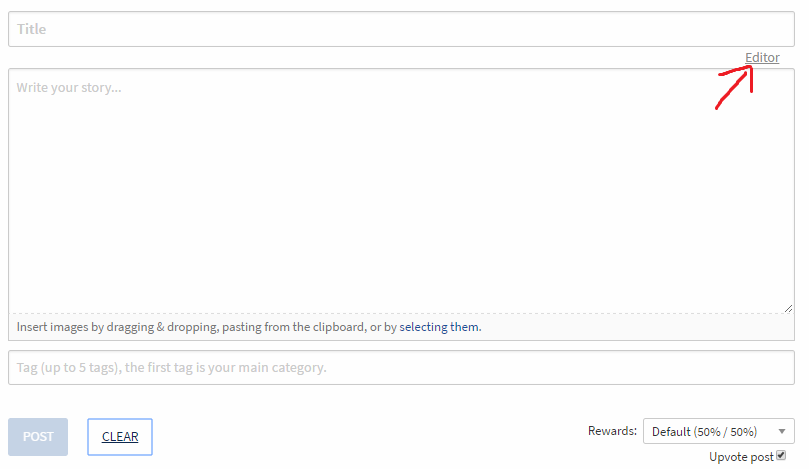
Then you have to find your picture link and place the <center> and </center> (called center tags) around it. You will see some tags that look like <p> and </p> in there. Put the center tags outside of these.
Example: 
If this gives you trouble, don't let it get to you. It's way harder than it needs to be in my opinion. But once you do it a time or two, it gets easy pretty quick.
Q: How do you get those fancy section dividers in your posts @sykochica?
This on is EASY!! You just put them in like any other picture. If you search google image (setting reuse license to labeled for reuse of course) for 'page divider' you will find a ton of options. Just find the one you like, resize and/or crop it if you want to and you're ready to go. Toss it into your post just like any other picture.
Rather than having to upload my page divider every time I post, I just reuse the link for it from previous posts.
Q: Should I get a fancy signature for end of my posts?
Using a personalized signature or not is really a personal preference. Don't feel like you have to, I just enjoy it myself.
If you want a custom signature, there are multiple places that will create them for free! Mine is actually from the Online Signature website. However, if you google 'online signature generator' you'll find many other sites with their own options.
After you create it, it's given to you as an image file (jpg, png, etc) which you put in your post just like any other picture.
Q: You said something about there being a template I could use?
Months ago a @thecryptofiend, @rubellitefae and I made a bunch of different Steemit post templates which are free to use. Here are the posts showing what the different templates look like as well as download links.
To use these, you MUST have your editor set to Markdown mode (meaning it will say 'editor in the top right corner) before pasting the template in.
Once you've copy/pasted it in, just replace things with your own. The different sections will either having an example in there or say something like "put picture here." A few of these templates are harder to use than others. So if one doesn't seem to work well for you, just try another and it'll probably be a lot easier.
Feel free to ask me anything. I'm here to Help!

Previous Helpful Posts for Newbies
❓Answering Common Questions: What are all these keys in my wallet? Why so many? 🔑
❓Answering Common Questions: What should I write about? ✏️
❓Answering Common Questions: I'm getting frustrated...Are my Expectations too high? 🙍
❓Answering Common Questions: Why am I not getting votes? What can I do about it? 📷
❓Answering Common Questions: Why am I not getting votes? What can I do about it? 📷
❓Answering Common Questions: Where does the money come from? 💵
❓Answering Common Questions: Should I use 100% Steem Power or 50%/50% Payouts for my Post❓
❓Answering Common Questions: Reputation and Flags! What's this Number by my Name? #️⃣️
❓Answering Common Questions: Steem, Steem Power, Steem Dollars and What Should I do with them? 💲
What's this Slider Bar and Vote Power Percentage? What's the Difference?
Why Newbies Should be Excited about the next Hardfork
Answering Common Questions about Voting and Curation
Don't Miss the Show! Follow the Steemit Talk Podcast (STP) Account
New STP Website!!
Are you new to Steemit and Looking for Answers? - Try https://www.steemithelp.net.

Image Sources:
Woman
As with most things these days Google is your friend you can find pretty much all the markdown or HTML code you need (Remember you can't mix the two) Personally I find writing in raw, that's actual HTML or Markdown code, easier. Time consuming but you feel more rewarded in the "I created that!" stakes.
Here is how to achieve Left, Centre and Right for your images under HTML Simply change the pull-left to pull-right for right images. To centre simply remove class="pull-left" and close up
<div>don't forget the Internet prefers the American spelling so its<center>Tada!
<div class="pull-left">


<center>
<br/>
</center>
</div>
image source
Great addition!! Thanks for tossing that in here! The floats definitely take things to another level.
I'm the same way...always in markdown/html mode. Having done some website building it wasn't anything out of my wheelhouse..I just figured there were a chunk of people who preferred the WYSIWYG editor so wanted to include both options.
Oh I have my lazy days and prefer wysiwyg. I'm a great believer in: WHATEVER GETS THE JOB DONE!
Some people get hung up on how something is produced and forget that it is the End Result that's important. :-)
Pete
true!
LOVE this! I am not a newbie (in fact, an oldbie ;-) but I have been wondering about centering my posts for months! lol And I think I've been too lazy to have a fancy signature....well, when I get a moment, I'll remember to check back here.
Thank you @sykochica! I re-steemed for my newbie followers :-)
Hehe...we're all constantly learning, Myself included!
I've enjoyed having my subtle signature for a while...feels like a good closing. I'll keep an eye out and see what you end up doing with these 'new tricks.' :)
Thanks for the super helpful tips @sykochica! I'm going to use the divider tip and the signature. It makes all your posts look super professional, I love it. Dying to check out those templates too and possibly creating some of my own. Upvoted for sure!
You're welcome! I'm happy to help out.
Let me know how the templates treat you. It may be time to get some newer ones put together.
Wonderful topic and very timely considering the growth of users.
Unfortunately I can't bring myself to use all the features of markdown and start making visually beautiful posts :D
Thank you!
Lol, you've seemed to get along just fine without the markdown. :P
Awesome post, tons of good information in there
thanks !
Thank you!! I'm happy to be able to help out! :D
Feel free to ask any questions should they come to mind. :)
I will used this ..haha
Thanks!
🍻 cheerz!!
Haha, thank you! Good to see you got it figured out!
Great stuff! And you remind me I need to create some copy and paste footer code.
It will be nice when the system offers automatic footers for posts, or post snippets you choose from. :)
Thank you!
Oh yea...the copy/paste footer saves sooo much time. I either just take if from a .rtf on my drive or edit/copy from a previous post.
Ohh..that would be a great feature to have!
Is there a way to center my pictures in markdown mode?
Yep...you'll just put the
<center> ... </center>tags around your image link. If this doesn't work, just delete the extra characters around the image link like the! []sort of stuff.Thank you.. Does it also work to center text?
Yep :)
Cool. Thank you
Just when I'm ready to call myself a steemit veteran; I pickup something new that was staring me in the face. Page dividers! I've just been using the in house line divider, boring. Thanks!
Scaredycatguide 2.0 begins now! Muuaaahahaha, lol
Great information @sykochica, I was actually trying to figure out how to make my own posts look a tiny bit elegant. Thanks for showing us how to do just that.
Thank you!! More than happy to help out! :)