How to setup a complete profile on your blog page. (tutorial for newbies with illustrations)

Introduction
I have been onboarding friends since I came back fully to Steemit last week. And a good number of them, almost all are active, so questions keep on coming about how to do what. I have to explain the platform features and how to work around here. Just this afternoon, I got a question. One of the newbies is struggling to set up their blog page profile and put all the information that should appear on top of their page. So I decided to do this tutorial.
A note to our new friends
After you created your Steemit account, the top of your blog page will have a black background with basic elements on such as your followers, date you joined, the people you are following, etc. Your page will look like this image below:
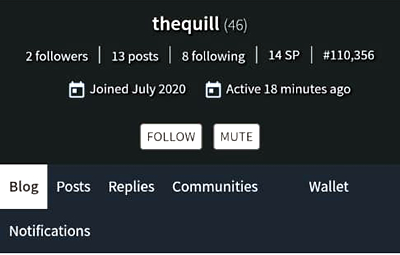
But then, you want to customize your page so that it will display information about you, including your name and profile image. So this tutorial will show you how to add that personal touch to make your blog look unique and stand out.
Steps to setting up your complete profile
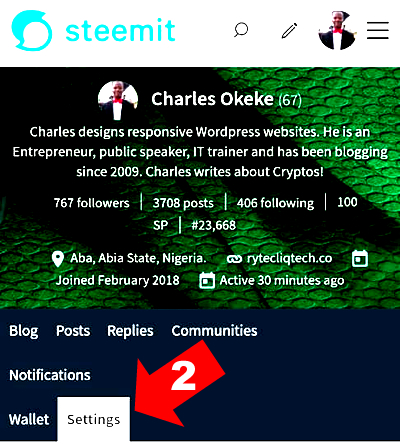
Step 1. Sign in to your blog using your posting key.
Step 2. Click Settings. (Check the illustration above)
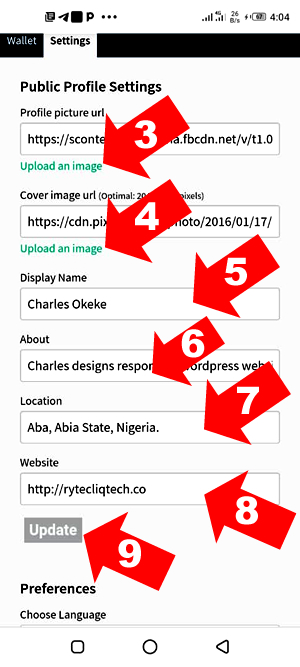
Step 3. Click here to upload your profile image. (Check the illustration above)
Step 4. Click here to upload a cover image for your blog,
Step 5. This is where you will enter your full name or any names you want to be identified with.
Step 6. This is where you will type a brief bio about you. first-time visitors will use this info to know your niche.
Step 7. Type in your location here.
Step 8. This is where you will put your website address or your social media handles
Step 9. Click this button to save your information.
Congratulations, you have successfully updated your page. After few minutes, refresh your blog page to see the new changes take effect. Now your blog page looks nice and unique.
Thanks
It was helpful
Ya ben olayı pek anlayamadım :))
thanks for the guide
Muchas gracias :)
Saludos. Muchas gracias por esta guía. Está excelente, clara, precisa y sencilla. Saludos
me funsiono muy bien este post gracias
Gracias amigo Charles por la guía, soy novata y la necesitaba :)
i wonder why i cannot update my profile. can anyone help me please? greatly appreciated! :)
https://www.rauhane.net/
https://www.elso9.com
https://www.s3udy.org
https://www.eljnoub.com
https://www.q8yat.org
Thank You Very Much!
@focusnow this is good. Success to all the newbies that will find this tutirial.
It will be helpful. I will make more of those tutorials to help our group. @talktofaith.
You have been upvoted by Steem Greeters from STEEM POD Project and we are voting with the Steemit Community Curator @steemcurator03 account to support the newcomers coming into steemit.
Please follow @steemitblog for the latest update and news on steem and @steemingcurators for Steem Community contest and challenges.
Very helpful, thank you! Steemit is so different than other sites that I have many questions as a newbie. Thanks again!
@breezybreport. Welcome to Steemit. It's a very nice place for content creators. I will help you to figure out what you need to do and other things about Steemit. I have been here since 2018. Will be checking your blog. Welcome
Thank you so much! I really appreciate it ❤