Where is the snipping tool of windows?!?!?! (If you know what it is).

Today we are not going to talk about google plugins!
So in the latest version of Windows 10, the snipping tool suddenly disappears.(It is especially difficult to find it in Windows in a language other than English)
What to do?
Just open the search bar (at the Start button!)

write Snippingtool.exe
And that's what you'll see :)
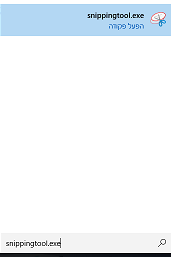
then you can click right on it and pin it to the task bar :)
What is the snipping tool?
Snipping Tool is a tool that allows you to take screenshots (know the prt sc button)
But to take only a part of it and save a lot of work!
Nice one. In fact a couple of days someone asked me if i knew of a sniffing tool and i said no :-) . Wish your post would have been a few days earlier my friend :-) . Anyways, now i know and can boost it proudly.
Regards Nainaz
#thealliance
Great post..thanks
thank you
You are wellcome..
I didn't know, all I do is search for it in the search panel on my window. Thanks for the information... Thumbs up
Well information thanks for share
Very handy to know, thanks for sharing.
Still my favorite tool for when using my computer. So underrated and I use it all the time for fun. It's so meta
This post is excellent.
I like this post.
I have Restreemed your post.
I always follow you.Please come check my profile once@amiramnoam
Good post, I am a photographer, it passes for my blog and sees my content, I hope that it should be of your taste :D greetings
Hey..@amiramnoam
great to see your post..
snipping tool on windows 10..
that's great..search and get it something.
thank's for sharing....
@RESTEEM##always
You are always featured in your topics I like very much especially regarding the Internet and the data processing