How to use MyEtherWallet for the EOS ICO

Using MyEtherWallet for the EOS ICO
I heard many people asking about how to use MEW for the EOS crowd sale, so I decided to try my best and create a (hopefully comprehensive) guide on how to do it. Be advised that I take no responsibility and recommend using MetaMask if you are not sure what you are doing!
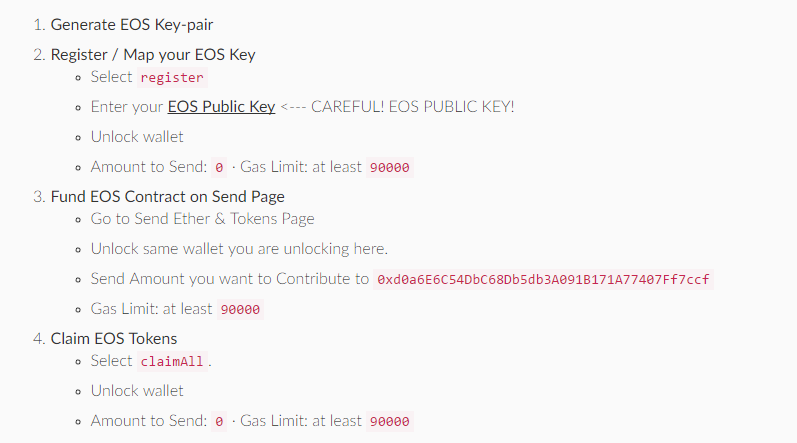
This is the official guide by the block.one/EOS team. For further instructions, keep reading.
Important information:
Contract address:  0xd0a6E6C54DbC68Db5db3A091B171A77407Ff7ccf

ABI / JSON Interface: will be filled automatically

Recommended gas limit: at least 90000
Always check eos.io, this information might be outdated! Last update: 06.26.2017
During the contribution window (First 5 days and every 23 hours afterwards):
Step 1)
To participate in the EOS Token distribution you will need to send ETH to the Ethereum smart contract address set forth below during a period of your choice. The EOS Tokens will be reserved for you to claim when the period is completed. The minimum contribution amount is 0.01 Ether.
First of all, you have to send Ether from your MyEtherWallet to the EOS Ethereum smart contract address as you would normally do and wait for the payment to be processed:

After the end of the window in which you want to contribute (it won't work while the windows is still open):
Step 2)
Go to Contracts and paste the contract address and ABI / JSON Interface:

Step 3)
Go to the Read/Write Contract section and select the ClaimAll function from the drop-down list.
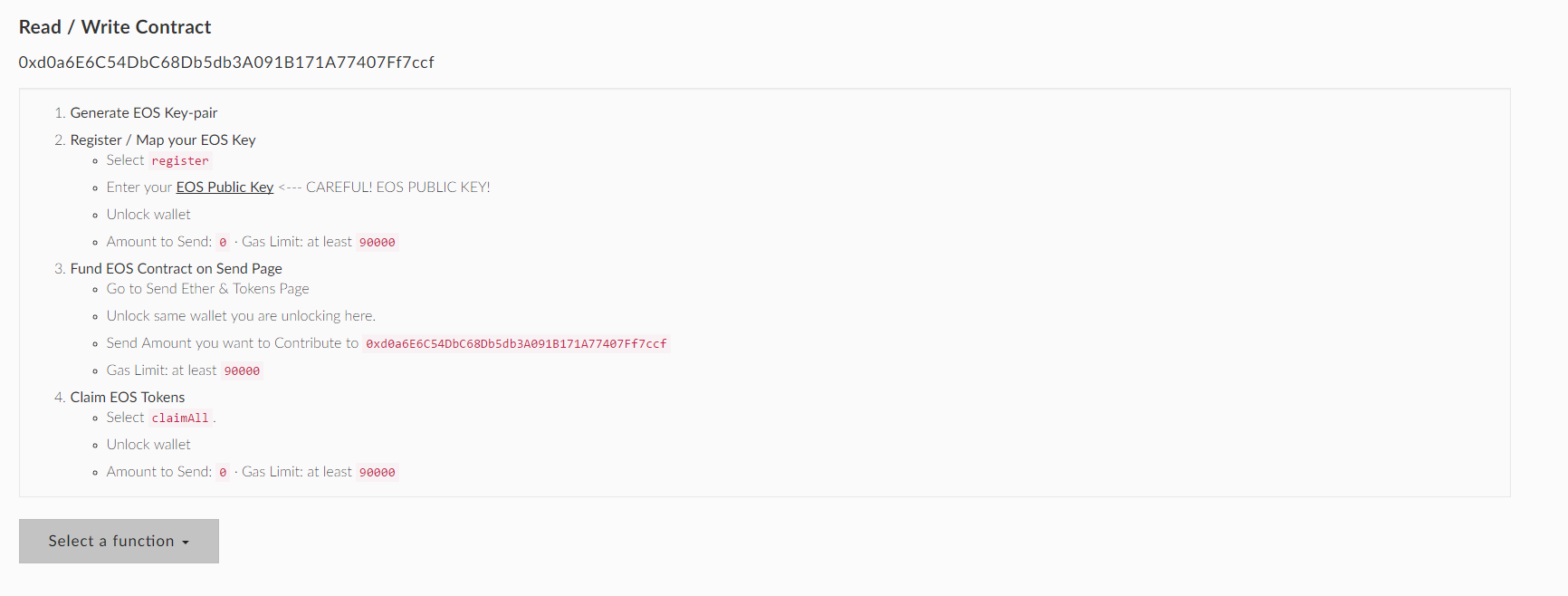
Step 4)
Load your wallet like you usually do (Private key, file, etc.) and unlock it. Click on Write.
Step 5)
You should see a new transaction window. Type in the following information. This is really important! A lower transaction limit is possible, but I can't guarantee that it will work.
- Amount: 0
- Gas limit: at least 90000
Click Generate transaction and finish off the transaction.
You should now be able to see your EOS Tokens in your wallet.
Registering your EOS public and private keys
In order to use you EOS tokens after the crowd sale end on June 1, 2018, you will have to register a public and a private key. If you don't do that, your funds will become worthless.
Step 1)
Go to the EOS key generator and generate a public and a private key. (by @nadejde)
Step 2)
Go back to the Contract page and open the same contract as before. Select the register function and submit your public key to link your ETH adress to your public/privat key combination.
To be sure, select the keys function and type in your Ether adress to see which EOS public key is linked to it. If you see the public key you just registered, you are fine.
This is my first post here, any feedback is appreciated! I couldn’t test this guide yet as the sale hasn't begun. It is solely based on information from the eos.io homepage. I will update it with pictures and instructions as soon as possible.

You should not call claim all until after end of window you contribute to.
Can you clarify? Do people know what "window they contribute to"? I am with MEW and trying to update the page and keep track of all this so people don't hurt themselves
Well the "window" is the 5 day/ 23 hours period in which you can contribute. But I'll add that in the original psot.
Thanks for your comment, I'll add it
"After the end of the window" should be part of step 2
You are right, I changed that
do i need ETH in my wallet to claim the tokens ?
Yes
I have tried claiming my tokens many times but they don't show up. My original transaction is there. I have done the claimall a few times, I have generated the EOS key at least twice which I know is a waste, I have waited countless hours and tried again. Nothing I do is working. Do you have any suggestions? I wish I never purchased this ICO but there is no point in whining about it now. I just want to see that I have them. I don't know why they don't have an email address for these kinds of issues.
You have to add the token as a custom token: Token adress is 0x86fa049857e0209aa7d9e616f7eb3b3b78ecfdb0, 18 decimals, name is EOS.
I want to contribute separately 2~3 times in the same window. In this case, shouldn't I press 'claim all'? Then what should I do?
Thank you.
You should use claimAll after the end of the windows, no matter how often you contributed durin the window.
So, do I have to use 'claimALL' after the end of window, or just after making multiple contribution (but before the end of window)?
I am confused about this, because if one makes a single contribution, then he/she will use 'claimALL' just right after the contribution (but not the end of the window).
Thank you for the reply.
Thanks for your correction.
I'm a core member of African recruitment team to help spread and touch the lives of we Africans through steem. I'd love you to check on my blog for the little post for better informing our new recruits so that they wouldn't repeat our mistakes on this platform. Your comments and suggestions will be my source of motivation and inspirations. Thank you.
Woah. That's kind of important. I'll try to mention this where I think it should be mention. What would be the consequence. Is it possible to reclaim all a second time for the same window?
I think you can't claim at all during the window, as the price isn't fixed until after the window is closed. Haven't tried it yet.
What happens if you did it prior to the end of the contribution period? Will you be able to do it again?
Time will tell as I accidentally did just that. Will try to claim again after the window. Tomorrow I hope their distribution application is back up and running again, I miss that overview.
Thanks for the turtorial, and making the lives easier for the rest of us!
That key generator, which is the most importnt part of all this is made by a fellow Steemian -- > @nadejde. I think tagging is appropriate.
You are right, props go to him. I also mentioned him in the post after the link to the generator.
Thanks razvan:) It was actually buit by the EOS team. I just removed the extra parts and published it.
I can't find the original one... and I hope it has the same functionality. A newbie here.
It's the original one, he just removed everything but the key generator.
Got it!
What does "window they contribute to" means? Is "window" means 1 day (23 hours period)?
Guys take care with the address put by mmakserm is fake site the right address is https://eos.io/instructions contract information that is display on this fake site is wrong don't lost your eth
I think I screwed up. For some reason I generated the transaction before I linked the public key to my wallet. :(
It doesn't matter when you link your public key. It's just important that you do it before June 1, 2018.
Could you possibly clarify which key (private/public) should be linked to EOS (private/public)?
You need to put the public key you generated into the function. Write down the public / private combination, but never give someone the private key.
Soooooo.....the private key generatecis going to serve as the eos wallet?
Thank you so much for this!
Congratulations @thimom! You have completed some achievement on Steemit and have been rewarded with new badge(s) :
Click on any badge to view your own Board of Honnor on SteemitBoard.
For more information about SteemitBoard, click here
If you no longer want to receive notifications, reply to this comment with the word
STOPBy upvoting this notification, you can help all Steemit users. Learn how here!
Before investing in any ICO read my post https://steemit.com/cryptocurrency/@emble/be-very-careful-when-you-invest-in-crypto-ico-s-don-t-lose-your-hard-worked-money-to-scammers