how to fix microphone sound problem[Linux microphone parasite echo)
Hi my friend said that during the conversation it was the sound of echo and noise.I solved the problem like this.
- Open Terminal (ctrl + alt + t)
- write alsamixer and press enter
- The screen looks like the following
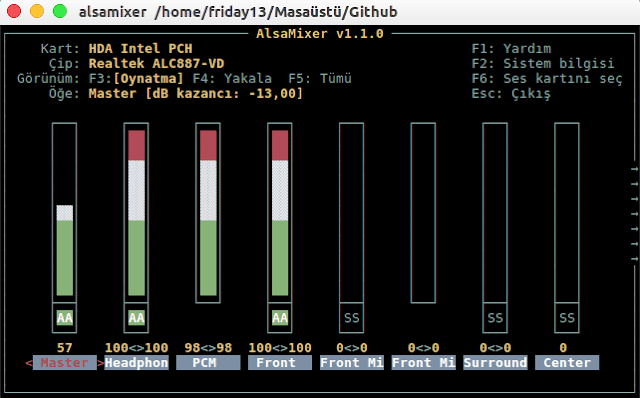
you can change your sound settings with the arrow keys and you can adjust your advanced settings by moving left and right.
F4 = Shows recording devices ie microphone and its variants.
F3 = Show playback devices
F5 = Show all audio devices.
F6 = Helps you choose your sound card
If you can not see the advanced settings, lets open terminal
sudo add-apt-repository ppa:ubuntu-audio-dev
sudo apt-get update
sudo apt-get dist-upgrade
then reboot the system. After the system is turned on,
sudo nano /etc/pulse/default.pa
finding echo a line and add
load-module module-echo-cancel
Then enter the sound settings, the option will come out
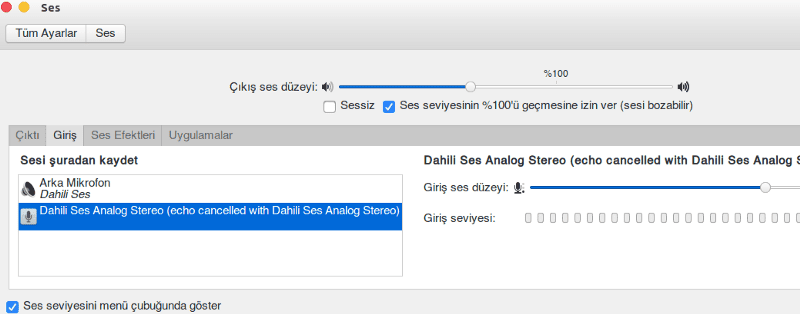
echo cancel
resolved ;)
My flight got delayed for three hours at the airport, so I started hunting for something decent to read instead of staring at the departure board. That’s how I found this news site. I was just reading about the appeal of celebrity gossip and how it offers a personal and relatable connection to the public, despite the difference in lifestyles. For people living in Canada who want quality content on the go, Technology canada works beautifully. I spent most of my wait in the entertainment section and loved every minute. It has since become my travel companion and daily habit.