Enhance Your DJ Sets with DDJ-1000 Jog Wheel Displays and Effects
If you're serious about elevating your DJ performances, the Pioneer DJ DDJ-1000 4-Channel Rekordbox DJ Controlle is one of the most powerful tools you can bring into your setup. Designed to replicate a club-standard layout while offering advanced digital flexibility, this controller stands out for its high-resolution jog wheel displays and dynamic effects system. Whether you're performing in a club, at private events, or streaming online, mastering these features can significantly transform your DJ sets from good to unforgettable.
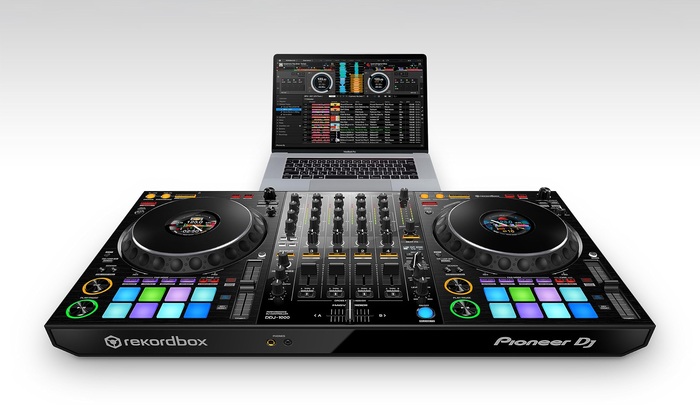
In this comprehensive guide, we’ll explore how to fully utilize the jog wheel displays and effects of the DDJ-1000, along with practical tips, creative techniques, and performance strategies. We’ll also guide you on where to buy this controller reliably in the USA.
Understanding the Power of the DDJ-1000
The DDJ-1000 is not just another DJ controller—it’s designed to bridge the gap between digital DJing and traditional club setups. With its full-sized jog wheels, onboard color displays, and professional mixer layout, it offers a seamless experience for DJs transitioning between controller-based and CDJ setups.
Key Features at a Glance
- Full-size jog wheels with built-in LCD displays
- 4-channel mixer with club-style layout
- Beat FX and Sound Color FX from professional DJ mixers
- Rekordbox DJ integration
- Performance pads for creative control
Among these, the jog wheel displays and effects system are the standout features that can dramatically enhance your performance.
Jog Wheel Displays: A Game-Changer for DJs
One of the most innovative aspects of the DDJ-1000 is the jog wheel display. Unlike traditional controllers, these jog wheels include built-in LCD screens that provide real-time track information.
What You Can See on Jog Displays
- Track position and waveform
- BPM (Beats Per Minute)
- Playback status
- Loop information
- Hot cue markers
This means you no longer have to constantly look at your laptop. Your focus stays on the controller—and more importantly, on your audience.
Benefits of Jog Wheel Displays
1. Improved Focus and Performance
By reducing dependency on your laptop screen, you can maintain better eye contact with your audience. This creates a stronger connection and enhances your stage presence.
2. Faster Track Navigation
You can instantly identify track progress, loops, and cues directly from the jog wheel. This speeds up your workflow and allows smoother transitions.
3. Club-Style Experience
The layout mimics professional CDJ setups, making it easier to transition between home practice and club performances.
Mastering Jog Wheel Techniques
To truly benefit from the jog wheel displays, you need to combine them with advanced techniques.
1. Precision Scratching
The DDJ-1000 jog wheels are highly responsive, making them ideal for scratching. With waveform and cue points visible directly on the jog, you can perform precise scratch routines without glancing at your laptop.
Tip: Practice baby scratches and chirps while monitoring cue points on the jog display.
2. Beat Matching by Sight
The built-in display allows you to visually align beats. While traditional DJs rely on headphones, visual beat matching can speed up your mixing process.
Tip: Use BPM and waveform alignment together for ultra-tight transitions.
3. Loop Control
Loops become more intuitive when you can see their exact position and length on the jog display.
Creative Idea:
Use loops to extend build-ups or create live remixes on the fly.
Effects: Elevate Your Sound Design
The DDJ-1000 includes professional-grade effects derived from high-end DJ mixers. These effects can transform a basic mix into a dynamic performance.
Types of Effects Available
Beat FX
- Echo
- Delay
- Reverb
- Flanger
- Phaser
- Spiral
Sound Color FX
- Filter
- Dub Echo
- Noise
- Pitch
How to Use Effects Creatively
1. Build Energy with Echo
Echo is perfect for transitions. Apply it just before dropping the next track to create anticipation.
Technique:
Reduce volume while increasing echo for a smooth fade-out.
2. Add Depth with Reverb
Reverb can make your mix feel spacious and atmospheric.
Best Use Case:
Breakdowns and ambient transitions.
3. Create Tension with Filter
Filters are essential for controlling frequency ranges.
Pro Tip:
Use a high-pass filter to gradually remove bass before a drop.
4. Experiment with Noise FX
Noise effects can add texture and excitement.
Creative Trick:
Use noise during build-ups combined with a rising filter.
Combining Jog Displays with Effects
The real magic happens when you use jog wheel displays and effects together.
Example Workflow
- Monitor track position on jog display
- Set a loop at the right moment
- Apply echo or reverb
- Transition smoothly into the next track
This workflow keeps your performance fluid and engaging.
Performance Tips for DJs
Stay Organized
Prepare your tracks in Rekordbox with cue points and loops. This ensures the jog display shows useful information during your set.
Practice Without Looking at Your Laptop
Train yourself to rely on jog displays. This improves your confidence and stage presence.
Use Effects Sparingly
Overusing effects can clutter your mix. Focus on timing and subtlety.
Read the Crowd
Technology is powerful, but your audience matters most. Use effects and transitions based on crowd energy.
Why the DDJ-1000 is Ideal for Professionals
The DDJ-1000 is designed for DJs who want:
- Club-standard performance
- Advanced creative control
- Seamless Rekordbox integration
- Professional sound quality
It’s suitable for:
- Club DJs
- Wedding DJs
- Mobile DJs
- Live stream performers
Where to Buy the DDJ-1000 in the USA
When purchasing professional DJ equipment, reliability matters. You want authentic products, proper support, and competitive pricing.
👉 Recommended Store:
Sole Source AV Supply
Why Choose Sole Source AV Supply?
- Trusted supplier of professional audio equipment
- Competitive pricing in the USA market
- Genuine Pioneer DJ products
- Reliable customer service
If you're planning to invest in the DDJ-1000, this is one of the best places to make your purchase.
Advanced Techniques for Pro DJs
Live Remixing
Use hot cues and loops visible on the jog display to remix tracks live.
Layering Tracks
With 4 channels, you can layer multiple tracks and apply effects to each.
FX Timing
Sync effects with BPM for cleaner transitions.
Creative Drops
Combine filters, echo, and jog wheel timing to create unique drops.
Common Mistakes to Avoid
Overusing Effects
Too many effects can ruin your mix.
Ignoring Track Preparation
Unprepared tracks lead to messy performances.
Relying Only on Visuals
Use your ears as much as your eyes.
Final Thoughts
The DDJ-1000 is more than just a controller—it’s a performance powerhouse. Its jog wheel displays reduce reliance on your laptop, while its effects system opens up endless creative possibilities.
By mastering these features, you can:
- Improve your workflow
- Enhance your creativity
- Deliver more engaging performances
If you're serious about DJing, investing in the Pioneer DJ DDJ-1000 4-Channel Rekordbox DJ Controller is a step toward professional-level performance.
And when you're ready to buy, remember that Sole Source AV Supply is one of the most reliable places in the USA to get your hands on this incredible controller.
Markdown Formatting Notes (Based on GitHub Guide)
This content uses:
#for headings##and###for subheadings**bold text**for emphasis- Lists using
-and numbered steps - Code block formatting using triple backticks
These elements follow the official GitHub Markdown styling guide for clean, readable, and structured content.
Start practicing, experiment with your creativity, and let your DJ sets stand out like never before.